OpenAI's Updated Chrome Extension Lets ChatGPT Read Your Tabs
OpenAI has upgraded its ChatGPT extension for Chrome, adding the ability for the assistant to view your open tabs for more contextual answers, alongside expanded agentic features for ChatGPT Work users. The extension works across Chromium-based browsers including Edge, Brave, and Opera.

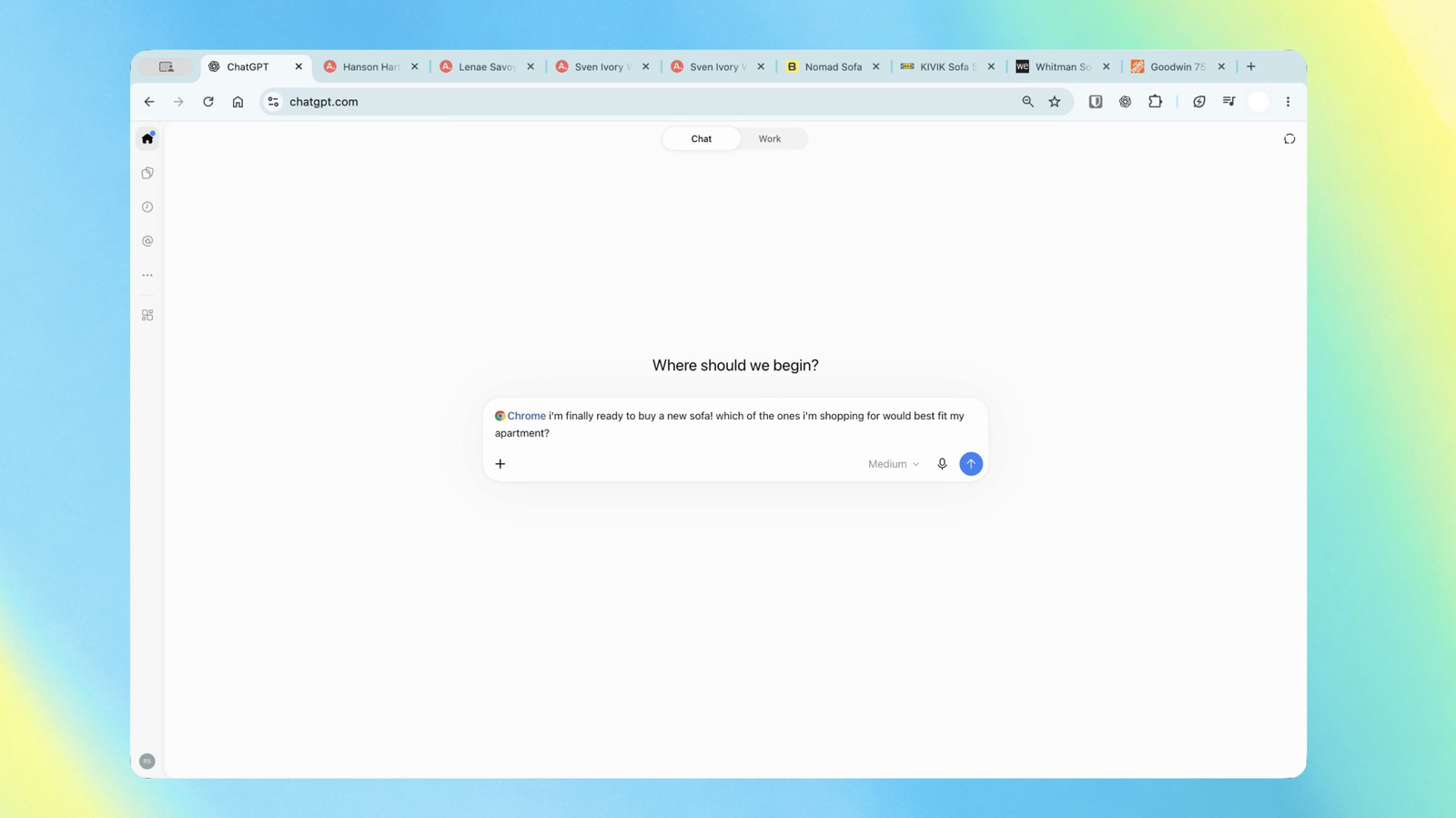
OpenAI has refreshed its ChatGPT extension for Chrome, giving the assistant the ability to look at your open browser tabs so it can provide answers tailored to what you are already viewing, according to Engadget. The update also expands what ChatGPT Work, the company's agent for multi-step tasks, can do directly inside the browser.
What the extension can now do
For users in ChatGPT Chat, the assistant can now inspect your open Chrome tabs and use that context to produce more useful replies. As Engadget illustrates, you could ask it to compare sofas spread across three tabs by dimensions, price, delivery time and return policy. The feature is aimed at reducing the need to copy and paste information between pages.
For ChatGPT Work, the expansion is more action-oriented. According to Engadget, the agent can send messages, fill out forms, organize tabs and complete other tasks on your behalf. One example given is asking ChatGPT to fill out a new dentist's form and then add the appointment to your calendar. Another is having it analyze contractors' terms across multiple open tabs and draft an email to the provider that best matches your requirements.
Sidebar access and broader browser support
Engadget reports that the ChatGPT sidebar in Chrome now has access to your full ChatGPT history, so you can ask questions or assign tasks without leaving the page you are on. The extension is available regardless of which ChatGPT plan you are on. OpenAI says it is compatible not only with Chrome but also with other Chromium-based browsers, including Microsoft Edge, Brave and Opera.
Context from OpenAI's browser history
The update follows OpenAI's decision to retire its own browser product on August 9, as noted by Engadget. After that, the company rolled out upgrades to the Chrome extension that positioned ChatGPT as a more viable alternative to Gemini in the browser. The latest changes build on that effort, pushing more of ChatGPT's capabilities directly into the browser environment.
What this means in practice
The tab-reading feature is the most immediately tangible change for everyday users. It allows ChatGPT to work with live information from your browsing session rather than relying solely on what you paste into the chat. That could be useful for comparison shopping, research and other tasks that involve multiple sources.
The ChatGPT Work additions are more significant for users who want the assistant to take action, not just provide information. Form-filling, calendar updates and draft emails are the kinds of tasks that previously required switching between apps. Engadget's examples suggest the feature is aimed at people juggling several service providers or administrative chores in one sitting.
Because the extension is available across all plans, the update is not gated behind a premium tier, though the exact capabilities may vary depending on whether you use Chat or Work.
Caveats
The source material does not specify how the extension handles privacy or what data it can access beyond open tabs and ChatGPT history. It also does not clarify whether the tab-reading feature requires explicit permission each time or operates continuously. Users who handle sensitive information in their browser may want to review those details before enabling the extension.
No release date or version number for the update was provided in the source material. OpenAI has not published a detailed changelog in the excerpt available.
Who should consider it
If you already use ChatGPT in Chrome and frequently compare products, research topics or manage tasks across multiple tabs, the new capabilities could reduce friction. For those who prefer not to grant an AI assistant visibility into their browsing activity, the upgrade may be less appealing.
The broader takeaway is that OpenAI is continuing to fold ChatGPT deeper into the browser, even after stepping back from its own browser project. Rival offerings from Google and others are moving in a similar direction, making the browser a key battleground for AI assistants.
Sources and further reading
See an error? Read our corrections policy or email [email protected].